Adding Kendo to asp.net MVC
To add Kendo to asp.net MVC razor here is what I had to do.
In the project root, create folder called Kendo and copy the following folders, js, styles and wrappers.

Copy the kendo razor templates wrappers\aspnetmvc\EditorTemplates\Razor -> Views\Shared\EditorTemplates
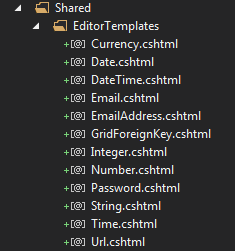
Add Kendo namespace to web.config in the view folder. If you have created areas, you need to add into those web.configs too
<pages pageBaseType="System.Web.Mvc.WebViewPage">
  <namespaces>
    <add namespace="System.Web.Mvc" />
    <add namespace="System.Web.Mvc.Ajax" />
    <add namespace="System.Web.Mvc.Html" />
    <add namespace="System.Web.Optimization" />
    <add namespace="System.Web.Routing" />
    <add namespace="Kendo.Mvc.UI" />
  </namespaces>
</pages>
- In the layout file _Layout.chtml add the following.
<link rel="stylesheet" href="//maxcdn.bootstrapcdn.com/bootstrap/3.2.0/css/bootstrap.min.css">
<link href="//cdn.kendostatic.com/2014.2.903/styles/kendo.common-bootstrap.min.css" rel="stylesheet" />
<link href="//cdn.kendostatic.com/2014.2.903/styles/kendo.default.mobile.min.css" rel="stylesheet" />
<link href="//cdn.kendostatic.com/2014.2.903/styles/kendo.bootstrap.min.css" rel="stylesheet" />
<script src="//cdn.kendostatic.com/2014.2.903/js/kendo.all.min.js"></script>
<script src="//cdn.kendostatic.com/2014.2.903/js/kendo.aspnetmvc.min.js"></script>
<script src="//cdn.kendostatic.com/2014.2.903/js/kendo.timezones.min.js"></script>